
v0.3.0 · Apache-2.0 · Windows · macOS · Linux
See what your agent actually did.
ThreadlineLM reads the audit logs your agent already writes — OpenAI-compatible, OpenTelemetry GenAI or LiteLLM — and rebuilds the run: every call, every tool call, every retry. Parsing happens on your machine.
Portable Windows build · 5.2 MB · no account, no telemetry

The run is gone. The log is not.
An agent fails and leaves a file: requests, streamed chunks, tool calls, retries, one 429 at 14:02:31. Grep gives you lines. It doesn't tell you which session a line belongs to, which call edited the file, or where the loop started.
ThreadlineLM parses that file and reconstructs the run — the conversation the model saw, the tools it called, what each call cost. Same evidence, readable.
        01
        {

        02
          "id": "evt_0009",

        03
          "ts": "2026-05-17T15:30:09.000Z",

        04
          "client": "eval-runner",

        05
          "model": "gemini/gemini-2.0-flash",

        06
          "status": 429,

        07
          "duration_ms": 95,

        08
          "upstream": { "status": 429 },

        09
          "req_body": {

        10
            "messages": [

        11
              {

        12
                "role": "user",

        13
                "content": "Translate to Spanish: good night."

        14
              }

        15
            ]

        16
          },

        17
          "resp_body": {

        18
            "error": {

        19
              "code": 429,

        20
              "status": "RESOURCE_EXHAUSTED"

        21
            }

        22
          }

        23
        }
Four ways into the same file.
The timeline is the index. Everything else is one keystroke away: the same events, read four ways, with no re-import.
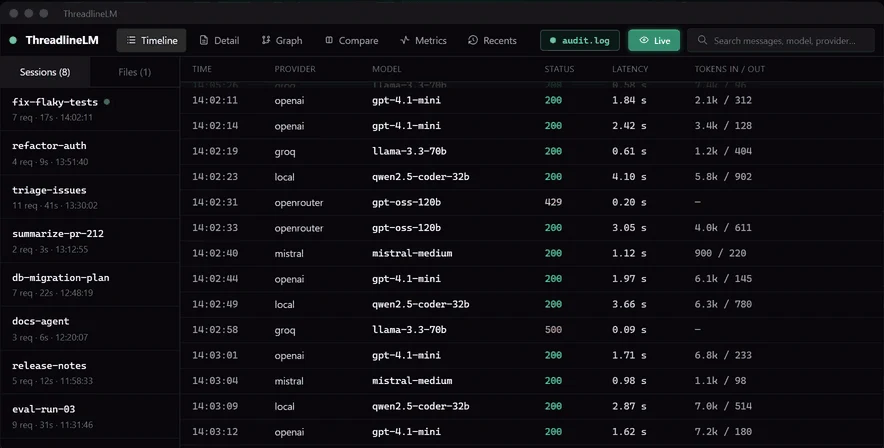
01 Timeline
Every call, in order
Provider, model, status, latency and tokens in/out. A failed request keeps its HTTP code instead of disappearing into a stack trace.
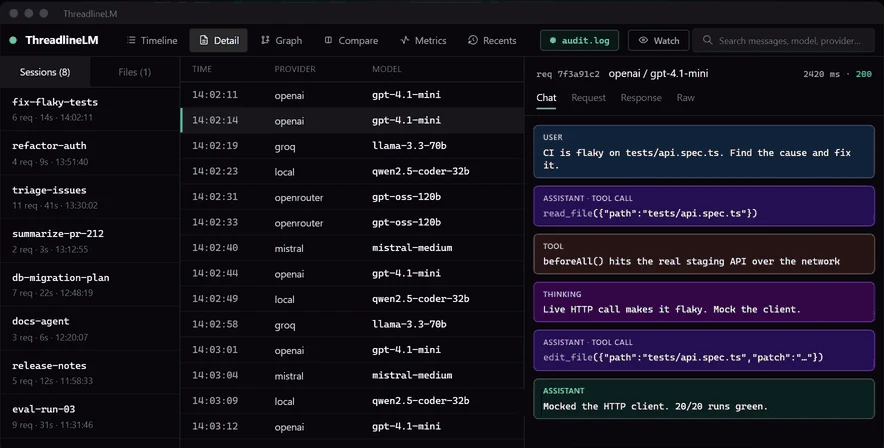
02 Chat
The conversation, rebuilt
User message, assistant tool call, tool result, reasoning and the final answer — in the order the model actually received them.
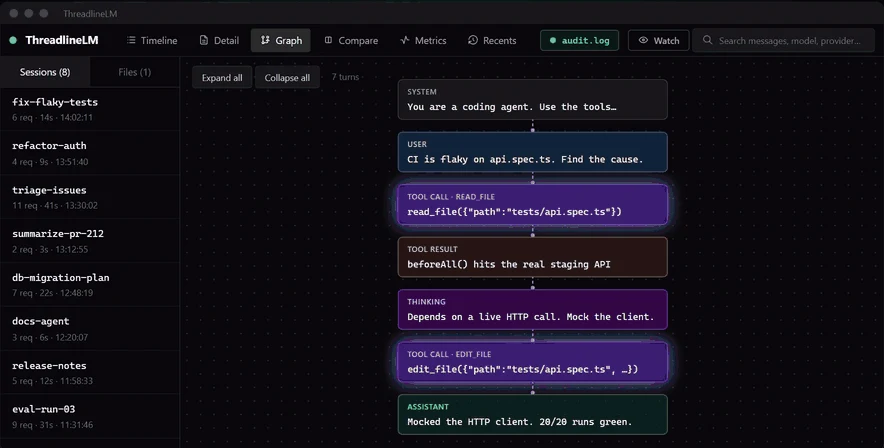
03 Graph
Tool calls as a flow
System, user, tool call, tool result, thinking and assistant nodes. Loops, retries and dead ends stop hiding in the JSON.
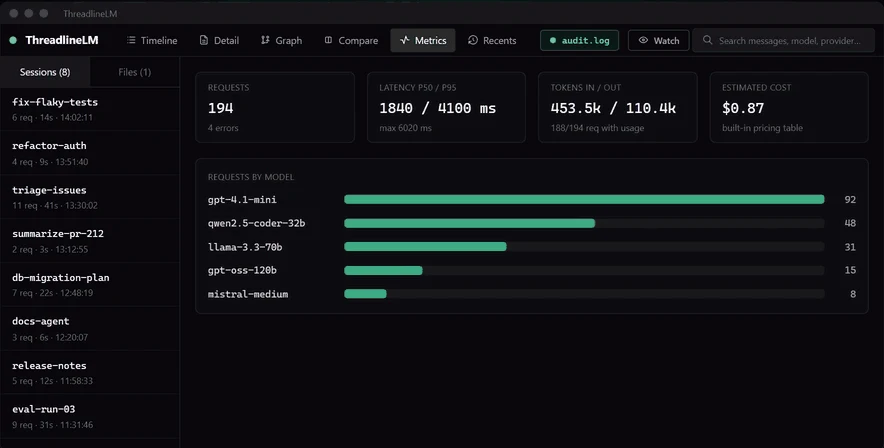
04 Metrics
Latency, tokens, cost
p50/p95/p99 latency, tokens in and out, estimated cost from a built-in price table, and requests by model.
Compare is the fifth tab: put a working call next to a broken one and diff request and response, field by field.
Ctrl+1…5Six formats. Detected by content, not by extension.
Drop the file on the window. The parser is chosen from the first records, so .log, .jsonl and .json all work.
| Format | What it reads | Example | Events |
|---|---|---|---|
| OpenAI-compatible audit JSONL | Tool calls, SSE streams, reasoning, Anthropic tool_use, 429 errors | audit.log | 9 |
| Audit records as a JSON array | The same records in a single array | audit-array.json | 3 |
| OpenTelemetry GenAI spans | One span per line; non-GenAI spans are skipped | otel-genai-spans.jsonl | 3 |
| OTLP/JSON envelope | resourceSpans with KeyValue attributes | otel-genai-otlp.json | 2 |
| LiteLLM StandardLoggingPayload | Streamed response, tool use, embedding, failure | litellm.jsonl | 5 |
| Plain-text proxy log | Audit JSON embedded in log lines | proxy-raw.log | 2 |
Every example is synthetic and ships in inputExample/. One record per line: pretty-printed multi-line JSON isn't detected yet.
- Watch
- Runs still being written
Re-reads the file every 500 ms while the agent works, so you can follow a run as it happens.
- Compare
- Working run vs broken run
Request and response of two calls, side by side, field by field.
- Export
- Markdown for the ticket
Fuzzy search across calls, then export a session to paste into the bug report.
Nothing leaves the machine.
No account, no telemetry, no cloud, no update pings. Parsing runs in Rust, in memory. The log is never uploaded, and nothing is written except the Markdown you ask for.
The app opens no socket. The timeline builds with the network cable unplugged.
The file is read, parsed and dropped when the window closes. No cache, no copy on disk.
Apache-2.0. The parsers and IPC commands are a few Rust files — read them, or build the binary yourself.
From file to timeline.
Parsing and session grouping stay in the Rust backend; the interface receives typed results over Tauri IPC.
The first records pick the parser. Unknown lines are skipped, not fatal.
RustRequests, responses, tool calls, reasoning, usage and status.
4 parsersCalls become sessions by client and a 10-minute window.
session.rsChat order, tool results and graph edges for each session.
store.tsVirtualized lists, fuzzy search, Markdown export.
React · IPCTake it for a run.
Drop inputExample/audit.log on the window: 9 calls in the timeline, the rebuilt chat, the graph and p50/p95 latency.
Builds aren't code-signed yet. On Windows, SmartScreen asks for More info → Run anyway. On macOS, clear the flag once: xattr -dr com.apple.quarantine /Applications/ThreadlineLM.app
Early: v0.3.0. Formats and views are stable enough for daily debugging; unusual log shapes can still trip a parser. An issue with a redacted sample is the most useful report.
Or build it
Node 20+, pnpm 10+, a stable Rust toolchain and the Tauri system dependencies.